Nano Banana MCP
An MCP server that adds image generation to Claude and Claude Code.
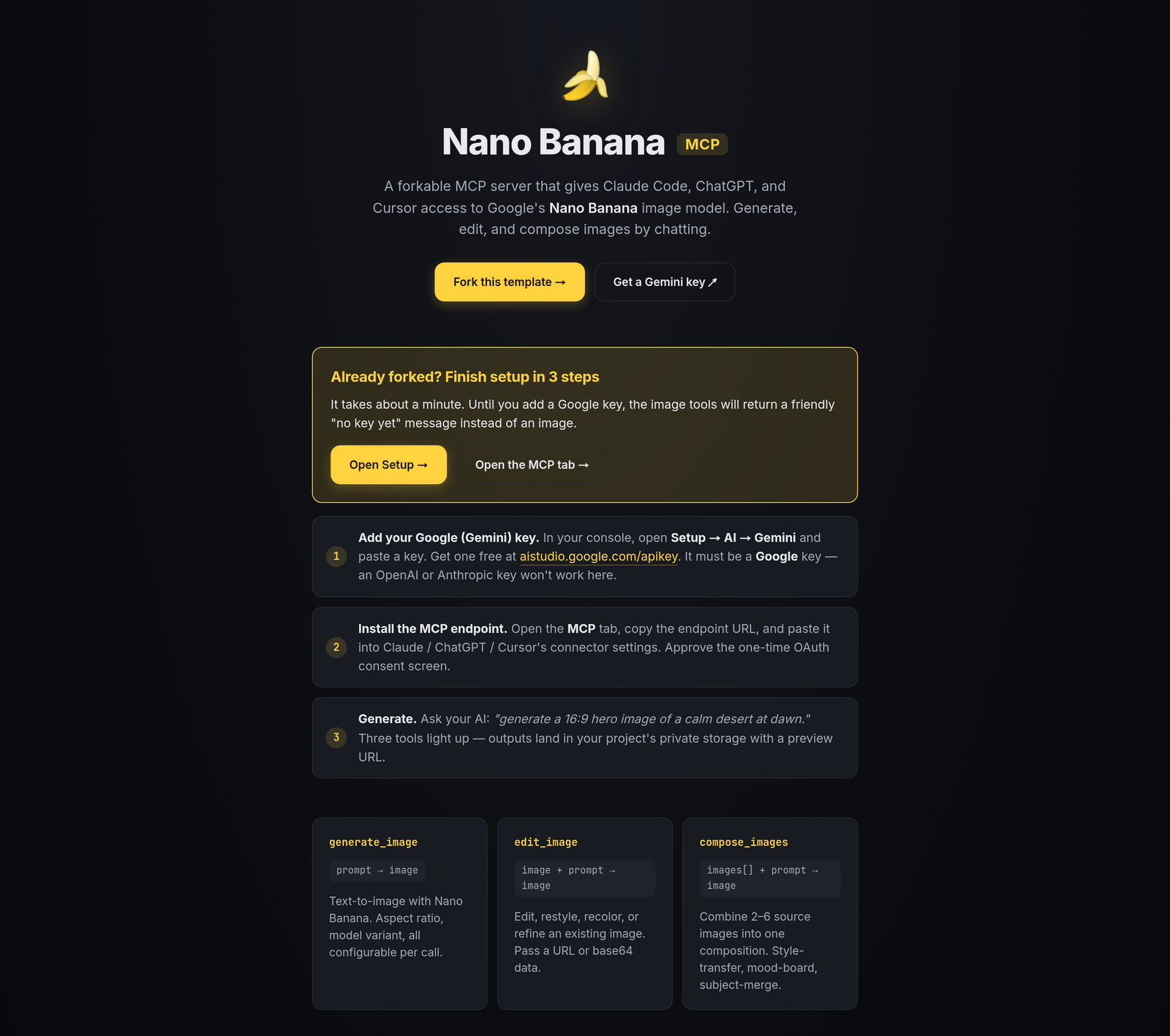
Claude is good at a lot of things but it can't make images. So every time you want a hero shot for a landing page, a favicon, a quick mockup, or some generative art, you end up in a different tab. Generate it in ChatGPT or Midjourney, download, drop it back into Claude. Same loop every time.
This template runs an MCP server that gives Claude (and Claude Code, Cursor, ChatGPT, anything else that speaks MCP) three new tools: generate_image, edit_image, and compose_images. Under the hood they call Google's Gemini image model, the one Google nicknamed "nano banana." Once you've connected it, image generation works the same as any other Claude tool. You describe what you want, the image comes back, and Claude can pass it into the next step.
The version of this that matters for coding: when you ask Claude Code to scaffold a landing page, it can generate the page's images at the same time. The hero, the testimonial avatars, the OG image, the empty-state illustrations — all written into your public/img/ folder by the same agent that's writing the HTML. You don't stop and switch to a separate image tool.
Bring your own Google AI Studio key. Google's free tier covers most personal use; anything beyond that is billed directly by Google, with no markup or per-image fee from us. Generated images get a short-lived URL Claude can pass back into edit_image or compose_images, so a chain like "make a logo, put it on a shirt, put the shirt on a model" works as three tool calls without you having to download and re-upload anything in between.
The whole template is open source. Host it on Hatchable, or run the MCP server somewhere else.
Talk to it from your AI
Once Nano Banana MCP is on your account, the same AI you used to install it can read its data, send its emails, and change its code — for the life of the project. Try things like:
Every Hatchable project ships with an MCP server scoped to it — how it works.
MCP tools
Describe what you want in plain English. Get a PNG back. Aspect ratio (1:1, 3:4, 4:3, 9:16, 16:9) and model variant (flash, pro, preview) are optional — Nano Banana follows long, descriptive prompts well, including style, lighting, and composition hints.
Hand it any image URL and an instruction: "add a hat," "extend the sky to the left," "remove the background," "restyle in watercolor." Comes back edited, with the same subject preserved.
Blend two or more images into one. Product on a custom background, a character moved into a new scene, two reference shots collapsed into a single mood-board frame. Instruction tells the model how to combine them.
Features
Adds image generation to Claude
Connect the MCP server once to Claude Desktop, Claude Code, Cursor, or any other MCP-compatible client. Three tools show up in Claude's tool list: generate_image, edit_image, and compose_images. From then on, when you ask Claude for an image, it can actually make one.
Generate the page's images while Claude Code writes the page
When you're using Claude Code to build a landing page, dashboard, or any UI, Claude Code can generate the images for the page in the same prompt. Hero images, favicons, testimonial avatars, feature icons, OG images, empty-state illustrations: Claude Code writes them into your public/img/ folder alongside the rest of the code.
Edit images by describing what you want changed
Give the AI an image URL and tell it what to change in plain English. "Remove the background." "Add a hat." "Extend the sky to the left." "Make the colors match my brand." It returns a new image URL Claude can use right away.
Combine multiple images into one
Drop a product onto a custom background. Move a character into a new scene. Blend two reference shots into one mood image. compose_images takes a list of source URLs and an instruction, and Gemini handles the multi-image reasoning.
Chain image calls without re-uploading
Generated images come back as short-lived URLs. Claude can pass those URLs straight into edit_image or compose_images for the next step, without having to download and re-upload anything. A sequence like "make a logo, put it on a t-shirt, put the t-shirt on a model" is three tool calls in a row.
Uses your own Google API key
Plug in a Google AI Studio key. Google's free tier is generous and covers most personal use. Anything beyond that gets billed directly by Google. No markup or per-image fee from us, no token cap, no surprise bill. You can switch between Gemini flash, pro, and preview models by changing one parameter.
What you get
- Source code, deployed to your account on Hatchable
- Your own subdomain (or BYO custom domain on the Builder plan)
- A real Postgres database, scoped to this app
- The ability to make a copy, edit it, and redeploy via your AI tool
- CSV export of your data, any time