Notebook MCP
The notebook your AI writes to — so the best parts of your chats don't vanish.
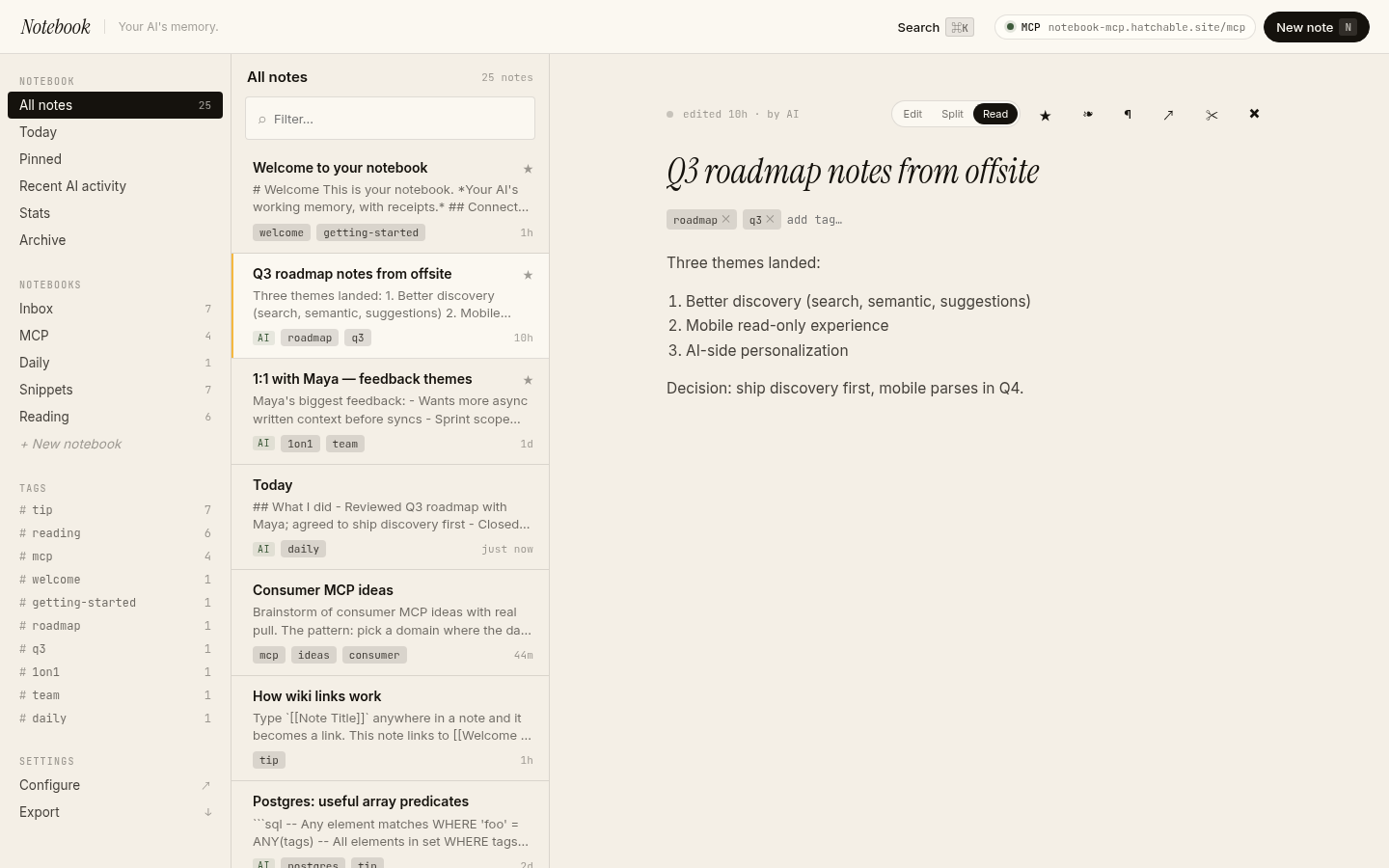
Every great ChatGPT or Claude conversation has at least one moment worth keeping — a sharp explanation, a debugging trick, a one-liner that crystallized a decision. By next week it's buried in a chat scroll you'll never find again.
Notebook MCP fixes that. Connect Claude Desktop, ChatGPT, Cursor, or any MCP-capable client once. From then on, the AI writes notes to your private notebook whenever you say "remember this," "log that," or "save this for later." Every note lands in a clean, searchable, editable web dashboard — yours forever, exportable any time.
A daily journal auto-creates from your template. Sharing a note is one click. A Cmd+K panel finds anything by keyword or by meaning, or asks the notebook a question and answers with citations from your own writing. A "Recent AI activity" view shows everything your AI captured in the last 14 days, with one-click Undo if it got something wrong.
No subscription. No third-party indexing service. Bring your own AI key (Anthropic, OpenAI, or Google) for the semantic-search and Ask-my-notebook features — or skip the key entirely and use it as a keyword-only notebook. The full source ships with the template; your notes, notebooks, tags, and revisions all live in a Postgres database you own.
Talk to it from your AI
Once Notebook MCP is on your account, the same AI you used to install it can read its data, send its emails, and change its code — for the life of the project. Try things like:
Every Hatchable project ships with an MCP server scoped to it — how it works.
MCP tools
Capture or update a note. mode="append" extends an existing note (great for daily logs, running lists). daily_date upserts today's journal entry without needing the id. The AI is expected to note_find first when there's any chance an existing note matches.
Search by keyword, tag, notebook, recency, or semantic meaning. mode="hybrid" (default) merges keyword + semantic. Use "since=7d" / "24h" / "30d" for time-windowed queries.
Retrieve a specific note by id with full body and backlinks. Usually preceded by note_find to discover the id. Returns markdown content wrapped in untrusted-text markers.
Manually link two notes. [[Wiki-style]] mentions inside note bodies are linked automatically on save — only call this for explicit "connect these two" requests. Pass remove=true to delete the link.
Pin, archive, or soft-delete a note. Hard delete is dashboard-only — the AI can't permanently destroy notes through this tool.
Generate or revoke a public read-only share link for a note. Honors the public_sharing config toggle; returns an error when sharing is disabled.
Create a new notebook (a collection of notes). Use only for explicit "make a new notebook" requests — note_write creates notebooks on demand when you pass an unrecognized notebook name.
List all notebooks with their note counts. Useful before note_write when the AI needs to know which notebook slugs exist.
Features
Just say "remember this" — your AI handles the rest
Connect Claude Desktop, ChatGPT, Cursor, or any MCP-capable client once. From then on, when you say "save that," "log this idea," or "what did I write about X last week" — your AI writes (or finds) the note for you. No copy-paste, no separate app to switch to.
A real notebook you can browse — not a black box
Every note your AI wrote is visible, editable, pinnable, taggable. Split-pane editor with markdown preview. [[Wiki-style links]] build a backlink graph automatically. Pin the important ones to the top; archive the rest.
Recent AI activity — with one-click Undo
See exactly what your AI captured in the last 14 days. Hit Undo on any change you didn't mean to make. Per-note revision history is capped at 50 entries, so a runaway agent can't silently rewrite your archive.
A daily journal that creates itself
Today's entry auto-creates from a Markdown template you control (default: "What I did / What I learned / Tomorrow"). Say "log this to today" and the AI appends. Flip back through any past day in two clicks.
Cmd+K: find anything, or ask the notebook a question
Hybrid search across every note — keyword + semantic, merged. Or switch to Ask mode and the notebook answers in plain English, with citations to the actual notes the answer came from. Not "ChatGPT, what do I know about X?" — "*my notebook*, what did I write about X?"
Yours. Forever. Exportable.
Your notebook lives in a Postgres database you own. Export to JSON or Markdown any time. The full source code ships with the template — host it on Hatchable, or move it anywhere that runs Postgres. No vendor lock-in, no monthly fee, no surprise pricing.
What you get
- Source code, deployed to your account on Hatchable
- Your own subdomain (or BYO custom domain on the Builder plan)
- A real Postgres database, scoped to this app
- The ability to make a copy, edit it, and redeploy via your AI tool
- CSV export of your data, any time