Scheduled Job
Cron + email + run history — the automation shape, done right.
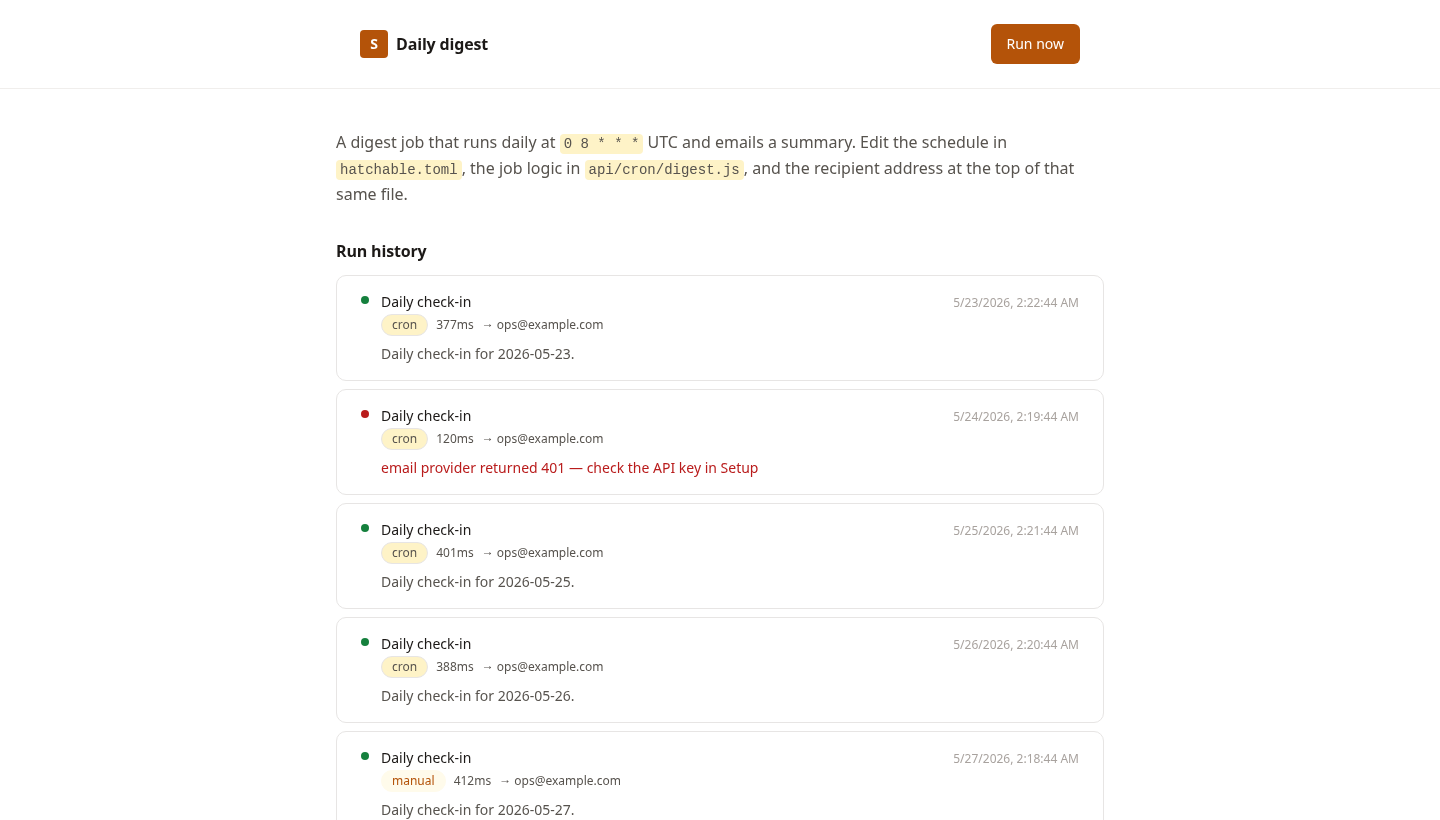
Almost every automation has the same shape: something runs on a schedule, does a bit of work, sends a message, and you want a record that it happened. A nightly report, a metrics digest, a monitoring check, a recurring export. Getting the plumbing right — registering the cron, sending email, configuring a recipient without a code edit, logging each run, and letting yourself trigger one on demand — is fiddly the first time and identical every time after.
This is that plumbing, already correct, as a starting point. It ships as a daily check-in: a `[[cron]]` block fires `api/cron/digest.js` at 8 AM UTC, the handler builds a summary and emails it, and every run — cron or manual, success or failure — is recorded in a `runs` table with its duration, recipient, and any error. The admin screen lists that history and gives you a Run now button so you don't have to wait for the next tick to test a change.
The recipient comes from a Configure field, so the owner sets the address once after deploying — no code edit, no secret in the source. Email keys (Resend, Postmark, SendGrid, SES) are pasted once in Setup. The scheduler route returns 404 to the public internet, so the job is reachable only by the platform.
Replace one function — `buildSummary()` — with whatever your job should actually do, change the cron expression, and you have a weekly metrics email, an uptime alert, an automated social post, or a recurring data export. The shape doesn't change; only the work does.
Features
A real cron, not a setTimeout
A [[cron]] block registers the job with the platform scheduler. It fires on the schedule you set, survives redeploys, and the route returns 404 to the public internet — reachable only by the scheduler.
Run history out of the box
Every run — scheduled or manual, success or error — is written to a runs table with its trigger, duration, recipient, and error message. The admin screen lists them so you always know what happened and when.
Trigger on demand
A Run now button defers to the same scheduler route via scheduler.now(), so you can test a change immediately instead of waiting for the next tick.
Config, not code edits
The recipient address comes from a Configure field the owner sets after deploying. Email provider keys are pasted once in Setup. No secrets in the source, no redeploy to change who gets the digest.
Reshape into any time-driven job
Replace one function — buildSummary() — and change the cron expression. The same foundation becomes a weekly metrics email, an uptime alert, an automated post, or a recurring export.
What you get
- Source code, deployed to your account on Hatchable
- Your own subdomain (or BYO custom domain on the Builder plan)
- A real Postgres database, scoped to this app
- The ability to make a copy, edit it, and redeploy via your AI tool
- CSV export of your data, any time